

Introduction
Software is everywhere in modern life. From smartphones and laptops to ATMs and smart TVs, almost every digital device depends on software to work properly. In simple words, software tells machines what to do and how to do it. Without it, even the most advanced hardware would be useless. Because of this, understanding software is no longer only for developers or IT professionals. It has become essential knowledge for students, business owners, freelancers, and everyday users.
When people hear the word software, they often think about mobile apps or computer programs. However, software is much more than that. It includes operating systems, tools, utilities, business platforms, and even invisible programs that run in the background. Each type plays a unique role in making technology useful, efficient, and reliable.
In today’s digital economy, software drives productivity, innovation, and communication. Businesses rely on it to manage operations, analyze data, and serve customers. Individuals use it to learn new skills, earn money online, and stay connected with others. As technology continues to grow, software is becoming smarter, faster, and more user friendly.
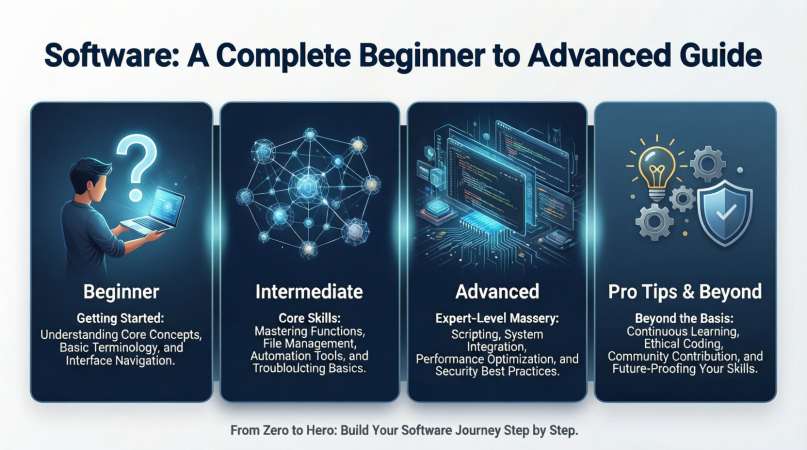
This guide is written for beginners and intermediate readers who want a clear and practical understanding of software. You will learn what software is, why it is important, how it works, its benefits and risks, common mistakes, and expert tips. By the end, you will feel confident using and choosing software wisely.
What is Software?
Software is a collection of instructions, data, or programs that tell a computer or digital device how to perform specific tasks. Unlike hardware, which you can physically touch, software exists in digital form. It runs on hardware and controls how the device behaves.
There are three main types of software. The first is system software. This includes operating systems like Windows, macOS, Linux, Android, and iOS. System software manages hardware resources and provides a platform for other programs to run smoothly.
The second type is application software. These are programs designed for users to perform specific tasks. Examples include word processors, web browsers, photo editors, accounting tools, and messaging apps. Most people interact with application software every day.
The third type is utility software. This software helps maintain, protect, and optimize devices. Antivirus programs, backup tools, disk cleaners, and file compression tools fall into this category. They work quietly but play an important role in system performance and security.
In simple terms, software acts as a bridge between users and machines. It translates human commands into actions that hardware can understand and execute.
Why is Software Important?
Software is important because it makes technology usable and meaningful. Without software, hardware is just a collection of electronic parts with no purpose. Software gives direction, structure, and intelligence to machines.
One major reason software matters is productivity. Businesses use software to automate tasks, manage teams, track finances, and communicate efficiently. This saves time, reduces errors, and increases overall performance.
Software also enables innovation. New ideas become reality through software development. From online learning platforms to digital banking systems, software has transformed how people live and work.
Another key reason is accessibility. Software allows people from different backgrounds to access information, education, and services easily. With the right software, even complex tasks become simple and user friendly.
Security is another area where software plays a crucial role. Operating systems and security tools protect devices from threats, data loss, and unauthorized access. Regular updates ensure systems stay safe against new risks.
In short, software supports growth, creativity, safety, and efficiency in both personal and professional life.
Detailed Step-by-Step Guide
Step 1: Identify Your Needs
Before choosing any software, clearly understand your goal. Are you looking to write documents, manage finances, design graphics, or run a business? Defining your needs helps narrow down options and avoid unnecessary features.
Step 2: Understand Software Types
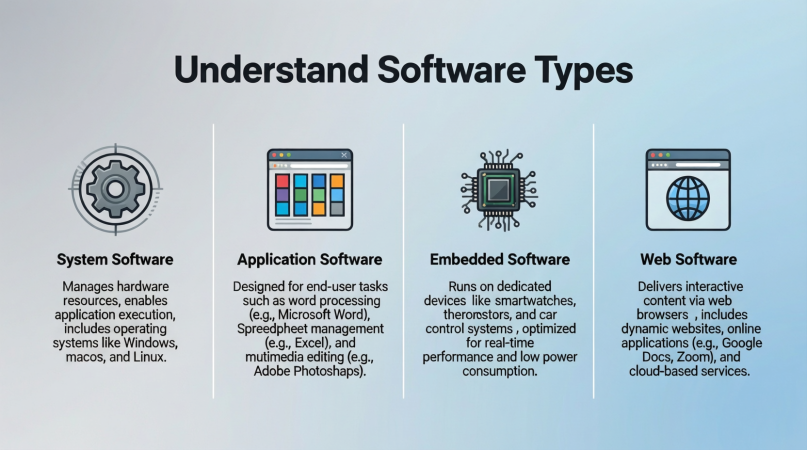
Learn whether you need system software, application software, or utility software. For example, if you want to edit videos, application software is required. If your device is slow, utility software may help.
Step 3: Check Compatibility
Always ensure the software is compatible with your device and operating system. Some software works only on specific platforms. Checking requirements prevents installation issues later.
Step 4: Compare Features
Compare different software options offering similar functions. Look at features, ease of use, customization, and support. Simple software is often better for beginners.
Step 5: Consider Cost and Licensing
Software can be free, paid, or subscription based. Free software is good for basic tasks, while paid options often provide advanced features and support. Understand licensing terms before purchasing.
Step 6: Install and Set Up Properly
Follow official installation instructions carefully. During setup, adjust settings according to your needs. Avoid installing unnecessary add-ons that may slow your system.
Step 7: Learn Through Practice
Spend time exploring the software. Use tutorials, help sections, and practice files. Regular use improves confidence and efficiency over time.
Step 8: Keep Software Updated
Updates fix bugs, improve performance, and enhance security. Enable automatic updates when possible to stay protected and enjoy new features.
Benefits of Software
- Improves productivity by automating repetitive tasks
- Enhances communication through messaging and collaboration tools
- Supports learning with educational platforms and resources
- Enables creativity through design and editing applications
- Increases accuracy in data processing and analysis
- Saves time and operational costs for businesses
- Improves security with protection and monitoring tools
Disadvantages / Risks
- High-quality software can be expensive
- Security risks if software is outdated or untrusted
- Learning curve for complex programs
- Dependence on software may reduce manual skills
- Compatibility issues between different systems
- Bugs and errors can disrupt work
- Overuse can lead to reduced human interaction
Common Mistakes to Avoid
Many users install software without understanding its purpose. This leads to clutter and confusion. Always choose software that meets your actual needs.
Another mistake is ignoring updates. Outdated software can become slow and vulnerable to security threats. Regular updates are essential.
Some users rely only on free software without checking limitations. Free versions may lack important features or support. Evaluate before committing long term.
Installing software from untrusted sources is also risky. It can expose your device to malware and data theft. Always use official or reliable sources.
Finally, not backing up data is a common error. Software issues can cause data loss. Regular backups protect valuable information.
FAQs
What is the difference between hardware and software?
Hardware refers to physical components like keyboards and processors, while software consists of digital programs that control how hardware works.
Can software work without the internet?
Yes, many software programs work offline. However, some cloud-based software requires an internet connection for full functionality.
Is free software safe to use?
Free software can be safe if downloaded from trusted sources. Always check reviews, permissions, and update history before installing.
How often should software be updated?
Software should be updated whenever updates are available. Regular updates improve performance and security.
What is open-source software?
Open-source software allows users to view, modify, and share its source code. It is often free and community supported.
Why does software sometimes crash?
Software can crash due to bugs, compatibility issues, low system resources, or conflicts with other programs.
Expert Tips & Bonus Points
Always start with simple software before moving to advanced tools. This builds confidence and understanding.
Keep your system clean by uninstalling unused programs. This improves performance and reduces confusion.
Use trial versions when available. Testing software before buying helps ensure it fits your needs.
Learn keyboard shortcuts and built-in features. Small tips can greatly improve efficiency.
Stay informed about updates and new versions. Technology changes fast, and staying updated gives you an advantage.
Finally, invest time in learning. The more you understand software, the more value you can get from it.
Conclusion
Software is the backbone of modern technology. It powers devices, supports businesses, and simplifies everyday tasks. Understanding software helps users make smarter decisions, save time, and work more efficiently. Whether you are a beginner exploring basic applications or an intermediate user looking to improve skills, learning about software is always beneficial.
As technology continues to evolve, software will play an even bigger role in shaping the future. New tools will emerge, and existing ones will become more powerful and accessible. By staying informed and adaptable, users can take full advantage of these changes.
Choosing the right software, using it correctly, and maintaining it regularly are key to success. Avoid common mistakes, stay updated, and focus on learning continuously. With the right approach, software becomes a powerful partner rather than a confusing challenge.
In the end, software is not just about programs and codes. It is about solving problems, creating opportunities, and making life easier. By understanding its value and using it wisely, anyone can benefit from the digital world with confidence and clarity.
