

Introduction
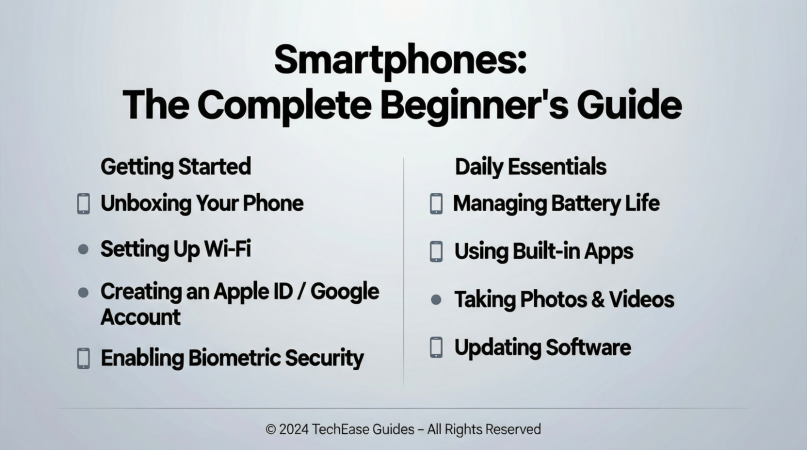
Smartphones have become an essential part of our daily lives. From communication to entertainment, and even work, these devices play a crucial role in modern living. If you are a beginner or someone looking to understand smartphones better, this guide will help you grasp everything you need to know. In simple terms, a smartphone is more than just a phone; it is a mini-computer that fits in your pocket. With technological advancements, smartphones now offer high-speed internet, high-resolution cameras, and applications that can simplify almost every aspect of life.
Choosing the right or understanding how to use it effectively can be overwhelming for many beginners. There are different operating systems, brands, and models, each with unique features. In this guide, we will explain what smartphones are, why they are important, how to use them, their benefits, risks, common mistakes, FAQs, and expert tips. By the end, you will have a clear understanding that will help you make smart decisions about your next smartphone or optimize the one you already have.
Whether you want a device for simple calling, social media, photography, or business, smartphones have something for everyone. So, let’s dive into this complete guide on smartphones to help you become more confident in using this powerful technology.
What is a Smartphone?
A smartphone is a portable electronic device that combines the functionalities of a traditional mobile phone with those of a computer. Unlike basic mobile phones, smartphones can run applications, access the internet, store large amounts of data, and perform complex tasks. They typically include features such as a touchscreen, camera, GPS, Wi-Fi, Bluetooth, and a range of sensors for different functions.
Smartphones operate on systems called operating systems (OS), such as Android or iOS, which manage hardware and software resources. They allow users to install apps for productivity, entertainment, education, and communication. Essentially, a smartphone is a versatile device designed to make life easier, more efficient, and more connected.
Why is a Smartphone Important?
Smartphones have become an indispensable tool in modern life. Here are a few reasons why they are so important:
- Communication – You can call, text, video chat, and connect with people globally.
- Internet Access – Smartphones give you access to instant information, news, and online services.
- Productivity – With apps for calendars, emails, and document editing, smartphones boost efficiency.
- Entertainment – They provide streaming services, games, and social media platforms for leisure.
- Photography & Videography – High-quality cameras allow you to capture professional-grade images and videos.
- Navigation – GPS features make it easy to find directions and locations.
- Financial Management – Smartphones support online banking, digital payments, and money transfers.
In short, smartphones are not just phones—they are gateways to managing life more effectively, staying connected, and accessing information instantly.
Detailed Step-by-Step Guide to Using Smartphones
Step 1: Choosing the Right Smartphone
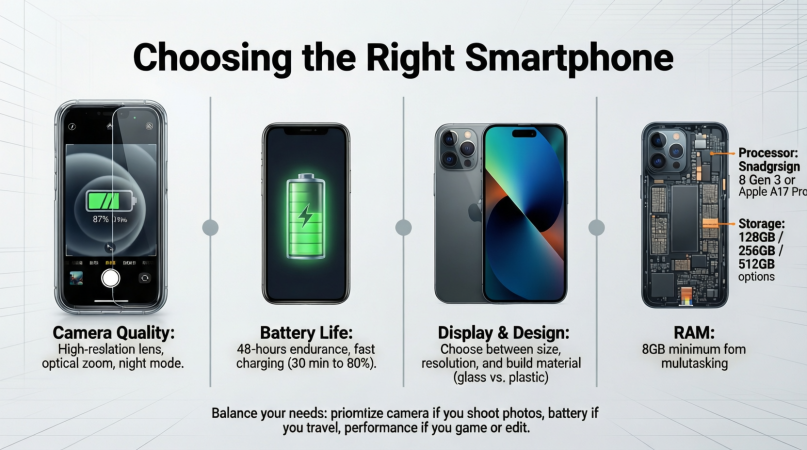
Selecting the right smartphone depends on your needs and budget. Here are some tips:
- Operating System: Choose between Android (customizable, wide range of options) or iOS (smooth performance, strong security).
- Budget: Set a budget that balances features and affordability.
- Screen Size: Pick a screen size that suits your comfort for browsing and watching videos.
- Camera Quality: If photography is a priority, compare camera specifications.
- Storage Capacity: Ensure your phone has enough storage for apps, photos, and videos.
Step 2: Setting Up Your Smartphone
Once you have your smartphone, follow these steps to set it up:
- Insert SIM card – Enables network connectivity.
- Charge the battery fully – Ensures optimal performance.
- Connect to Wi-Fi – Saves mobile data and improves download speeds.
- Sign in to your account – Android users with Google, iPhone users with Apple ID.
- Update the software – Ensures security and smooth operation.
- Install essential apps – Messaging, social media, banking, and productivity apps.
Step 3: Understanding the Interface
Smartphone interfaces are designed to be intuitive. Common features include:
- Home Screen – Your main screen with shortcuts to apps.
- Notifications Panel – Shows alerts, messages, and updates.
- Settings Menu – Customize your device, manage apps, and control security.
- App Drawer (Android) – Lists all installed apps.
- Control Center (iOS) – Quick access to settings like Wi-Fi, brightness, and volume.
Step 4: Connecting to the Internet
Smartphones rely on mobile data or Wi-Fi to access the internet:
- Wi-Fi: Connect at home, work, or public hotspots for faster and cheaper access.
- Mobile Data: Use cellular networks when Wi-Fi is unavailable.
- Data Management: Track usage to avoid exceeding your plan limits.
Step 5: Downloading and Managing Apps
Apps expand your smartphone’s functionality:
- Open App Store/Google Play Store.
- Search for desired apps.
- Check reviews and ratings.
- Install the app.
- Organize apps into folders for easy access.
Popular apps include messaging apps (WhatsApp, Messenger), streaming apps (Netflix, YouTube), productivity tools (Microsoft Office, Google Drive), and finance apps (PayPal, banking apps).
Step 6: Securing Your Smartphone
Security is essential to protect personal data:
- Use a strong password or biometric lock (fingerprint, face recognition).
- Enable two-factor authentication for accounts.
- Regularly update software and apps to patch vulnerabilities.
- Avoid downloading unknown apps or clicking suspicious links.
Step 7: Backing Up Data
Regular backups prevent data loss:
- Cloud Backup – Google Drive for Android, iCloud for iPhone.
- Local Backup – Transfer important files to a computer or external storage.
Benefits of Smartphones
Using a smartphone offers numerous benefits:
- Connectivity – Stay in touch with friends, family, and colleagues.
- Convenience – Manage multiple tasks from a single device.
- Information Access – Quickly find answers, news, and tutorials.
- Entertainment – Stream videos, play games, or listen to music anytime.
- Photography – Capture high-quality photos and videos.
- Navigation – GPS and maps help you reach destinations easily.
- Work on the Go – Check emails, edit documents, and collaborate remotely.
- Financial Management – Mobile banking, payments, and digital wallets simplify transactions.
Disadvantages / Risks of Smartphones
While smartphones are useful, there are risks to consider:
- Addiction – Excessive use can affect productivity and mental health.
- Privacy Concerns – Data tracking and unauthorized access are potential issues.
- Radiation Exposure – Prolonged use may raise health concerns.
- Battery Dependence – Frequent charging can be inconvenient.
- Cost – High-end smartphones can be expensive.
- Distraction – Social media and apps can reduce focus.
- Cybersecurity Risks – Malware, phishing, and scams can target users.
Common Mistakes to Avoid
Beginners often make mistakes that can reduce smartphone efficiency:
- Not updating software – Leads to security risks.
- Installing unnecessary apps – Slows down the device.
- Ignoring backups – Risk of losing important data.
- Using weak passwords – Makes devices vulnerable.
- Overcharging the battery – Reduces battery life over time.
- Ignoring storage management – Can lead to slow performance.
- Neglecting device cleaning – Dust and dirt affect usability.
Avoiding these mistakes ensures your smartphone lasts longer and functions efficiently.
Frequently Asked Questions (FAQs)
1. What is the best smartphone for beginners?
For beginners, choose a device with a simple interface, reliable support, and affordable pricing. Android phones like Samsung Galaxy A series or iPhones like the iPhone SE are ideal.
2. How often should I update my smartphone?
Update your smartphone as soon as new software or security patches are available. This ensures better performance, security, and new features.
3. Can smartphones affect health?
Excessive use may cause eye strain, sleep issues, and physical discomfort. It is advisable to take regular breaks, use blue light filters, and maintain posture.
4. How much storage do I need?
Depends on your usage. Casual users may need 64–128GB, while heavy users who store videos, photos, and apps may require 256GB or more.
5. Are smartphones secure for online banking?
Yes, if you use official apps, strong passwords, and enable two-factor authentication. Avoid unsecured Wi-Fi for financial transactions.
6. Can smartphones replace laptops?
For basic tasks like emails, browsing, and document editing, yes. However, for intensive work like video editing or programming, laptops are still preferable.
7. What is the lifespan of a smartphone?
Typically, smartphones last 2–4 years before performance slows or hardware becomes outdated. Regular maintenance can extend their lifespan.
8. Should I buy a flagship or budget smartphone?
It depends on your needs. Flagships offer advanced features and better performance, while budget phones cover essential tasks at a lower cost.
9. How can I improve smartphone battery life?
Reduce screen brightness, close unused apps, limit background processes, and use battery-saving modes.
10. Can I use a smartphone offline?
Yes, many functions like calling, messaging, offline apps, and stored media work without internet.
Expert Tips & Bonus Points
- Use Cloud Storage – Saves space and secures important data.
- Customize Notifications – Avoid unnecessary distractions.
- Regularly Clear Cache – Improves speed and performance.
- Explore Accessibility Features – Useful for vision, hearing, or motor impairments.
- Protect the Screen – Use screen protectors and durable cases.
- Learn Gestures & Shortcuts – Speeds up navigation and app usage.
- Use Smart Home Integration – Connect your smartphone with smart devices for convenience.
- Update Battery Habits – Charge between 20–80% for optimal battery life.
- Explore Hidden Features – Many smartphones have advanced camera, security, and productivity functions that users often overlook.
Conclusion
Smartphones have revolutionized the way we communicate, work, and entertain ourselves. From basic calling to advanced applications, these devices offer an incredible range of possibilities. Understanding what a smartphone is, how to choose one, use it efficiently, and maintain it properly can dramatically enhance your experience.
While smartphones come with certain risks such as addiction, privacy concerns, and distractions, practicing safe usage and following expert tips can minimize these issues. They are powerful tools that empower you to manage daily life, stay connected, and access information instantly. By making informed choices, avoiding common mistakes, and leveraging the benefits, you can get the most out of your smartphone and enjoy a smarter, more connected lifestyle.
Whether you are a beginner or an intermediate user, embracing smartphone technology responsibly opens doors to productivity, entertainment, and convenience that were once unimaginable. Invest time in learning its features, protect your data, and use it wisely to make your smartphone a valuable companion in everyday life.
